Desktop app for Mac & Windows

Bookkeeping without
the bloat

BeanSprout gives small businesses and non-profits the bookkeeping essentials - no subscription required, no complexity, no learning curve.

Download Free Trial Buy for $59

14-day free trial · $59 one-time purchase · No subscription required
BeanSprout dashboard showing account balances, recent transactions, and a profit-and-loss summary
macOS (Apple Silicon & Intel)
·
Windows 10 & 11
·
Your data stays yours

Bookkeeping essentials, nothing more

Built for real business owners, not accountants. Every feature earns its place.

Transaction Management

Import from bank CSV files or add manually. Categorize, search, filter, split, and review - with bulk actions to move fast.

Sales & Invoicing

Create professional invoices, track open balances, and record payments. Print-ready PDF output included.

Purchases & Bills

Track vendor bills, due dates, and payment history. Stay on top of what you owe without spreadsheets.

Financial Reports

Profit & Loss and Balance Sheet reports with flexible date ranges. Drill into any line item. Export to CSV or PDF.

Multiple Organizations

Manage several businesses or non-profits from one app. Switch instantly - each with its own books and settings.

Flexible Tagging

Tag transactions by project, client, grant, fund, or event - then filter and report on each. The cross-account tracking most apps lock behind paid tiers, included free.

Perfect when bookkeeping isn't your day job

Whether you update your books monthly or quarterly, BeanSprout makes it quick to log transactions, pull a basic P&L or balance sheet, and send the occasional invoice - then get back to your actual work.

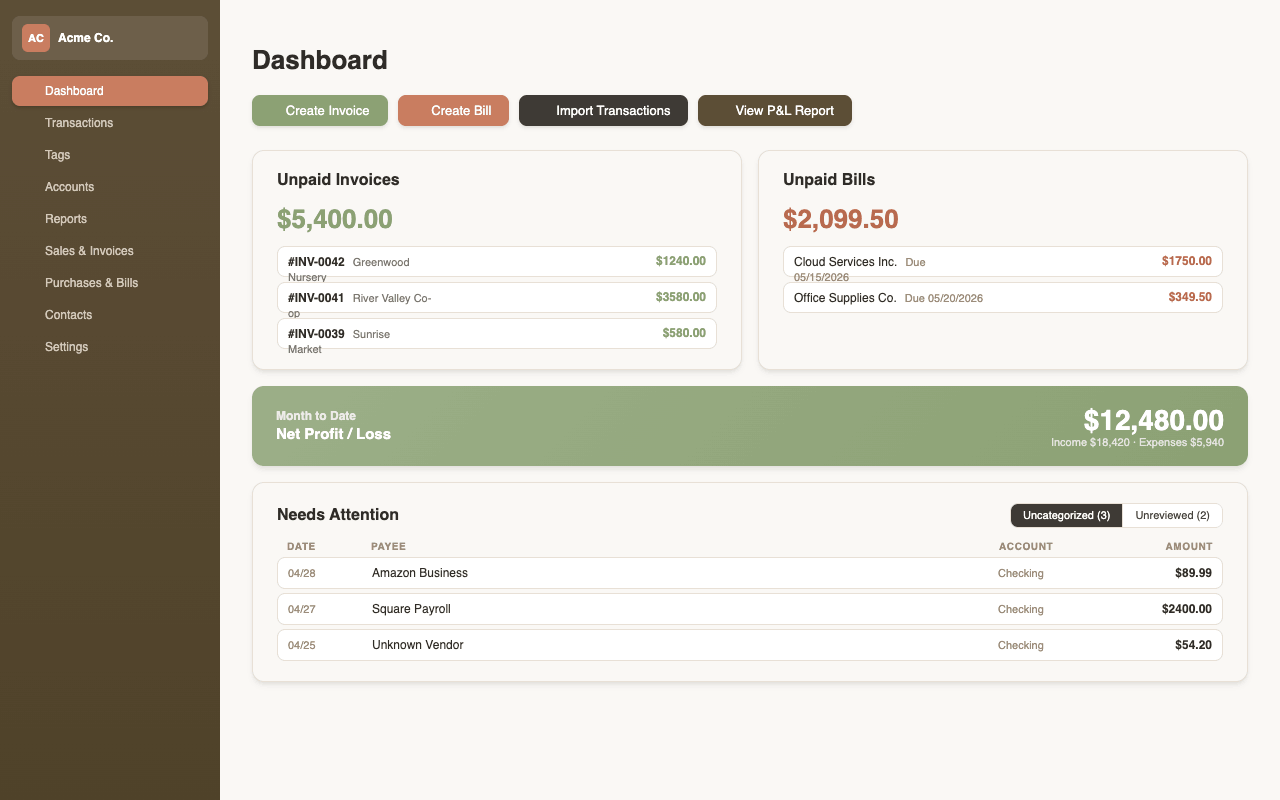
BeanSprout dashboard with cash balance, income vs. expenses chart, and recent activity

Everything at a glance

Your dashboard shows unpaid invoices, outstanding bills, and your month-to-date profit - without digging through menus.

  • Unpaid invoices and bills with running totals
  • Net profit widget with income vs. expense breakdown
  • Needs attention - unreviewed and uncategorized transactions
  • Quick-action buttons to create invoices, bills, or import transactions
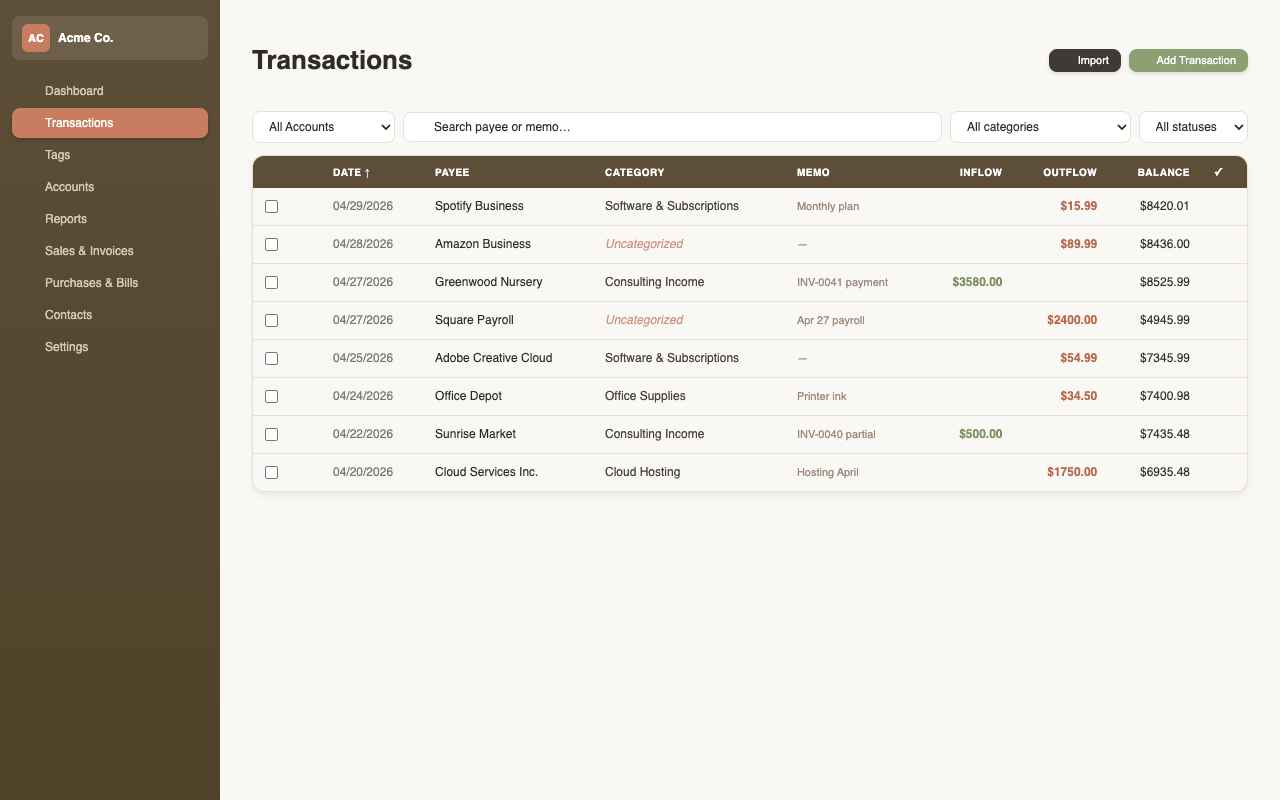
BeanSprout transactions list with categories, search, filters, and bulk actions

Transactions without the friction

Import your bank statement, categorize with a click, and mark as reviewed. Built for speed - not data entry.

  • Import from bank CSV - smart payee auto-matching
  • Bulk categorize or re-assign payees in one action
  • Split transactions across multiple accounts
  • Filter by account, category, date range, tags, and review status
  • Tag by project, client, fund, or event for cross-account reporting
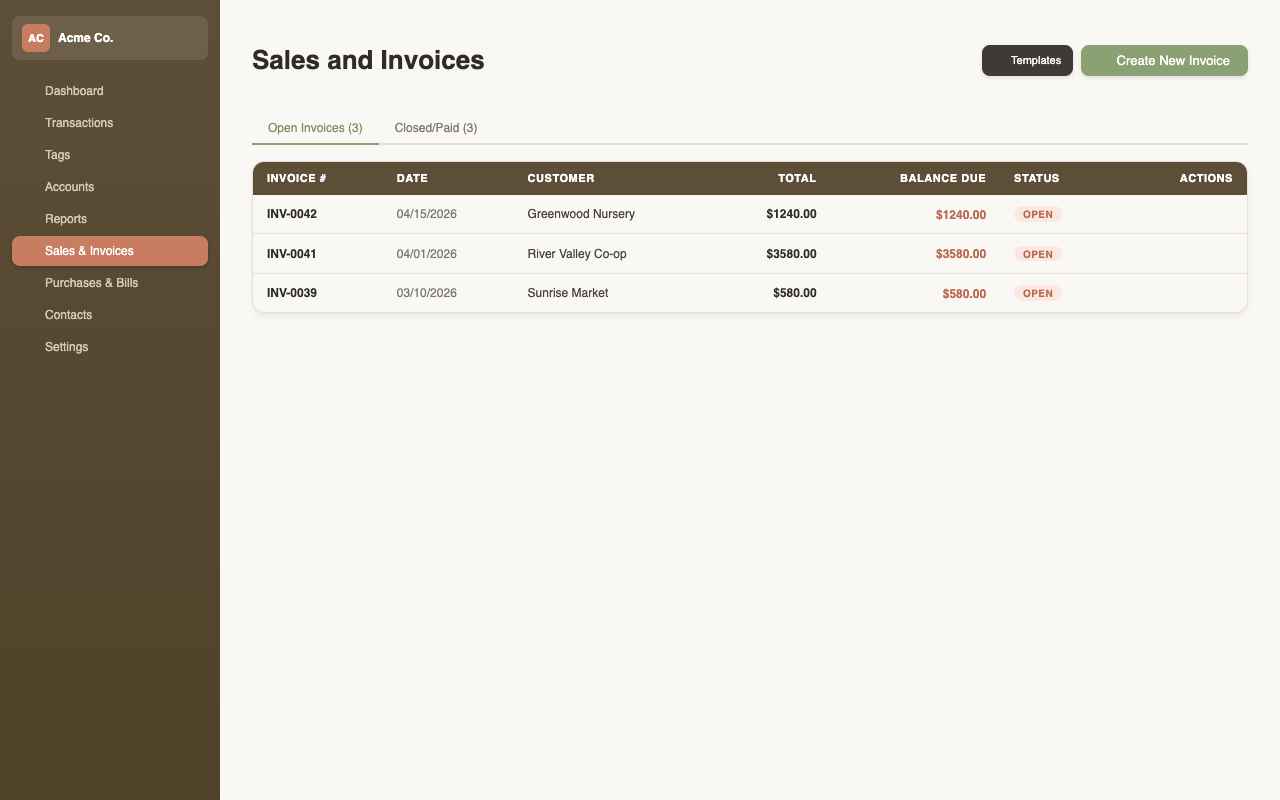
BeanSprout invoice editor with line items, totals, and open balance tracking

Invoice your customers with ease

Create clean invoices, track open balances, and record payments. Save line item templates to stop re-typing.

  • Professional invoice layout with your business details
  • Open and paid tabs - always know what's outstanding
  • Record partial and full payments, linked to transactions
  • Reusable line item templates for recurring services
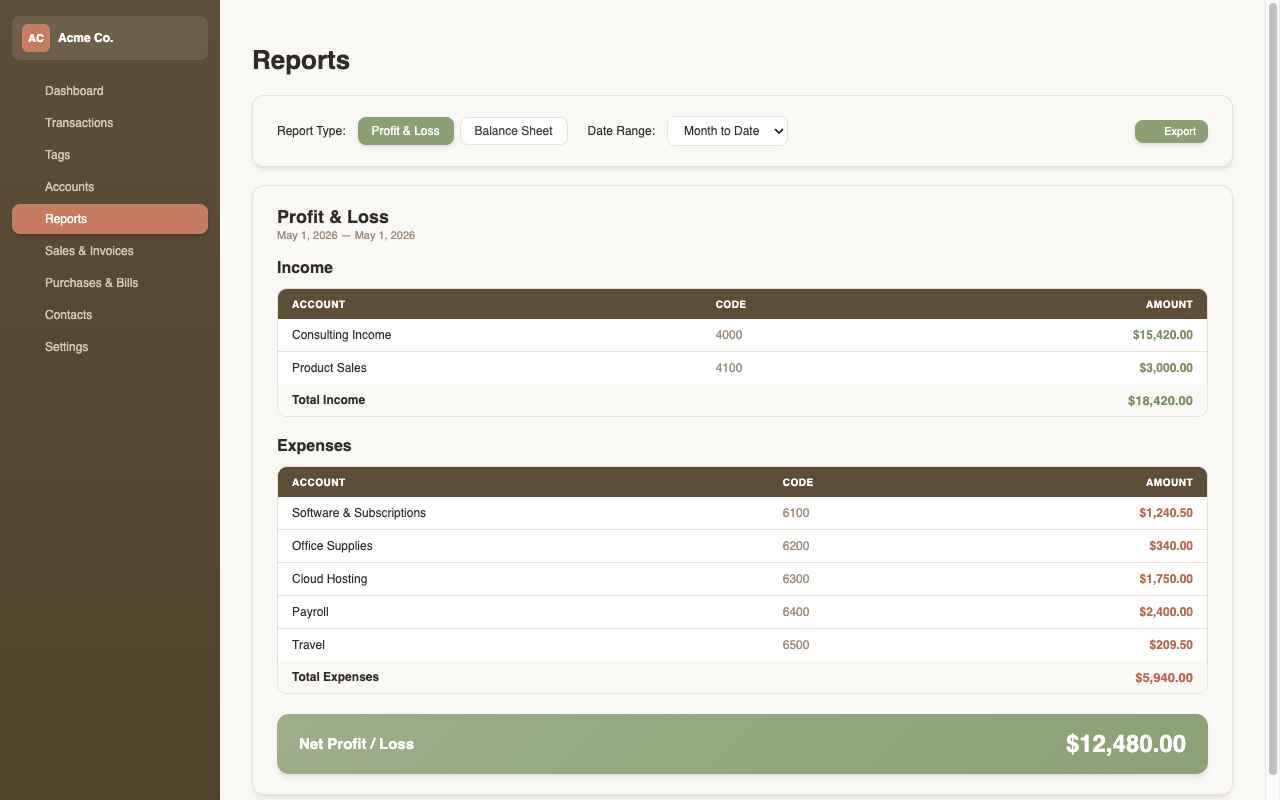
BeanSprout profit-and-loss and balance sheet reports with drill-down line items

Reports that are actually readable

P&L and Balance Sheet with flexible date ranges, tag-based reporting - see profit by project, client, or grant - and clickable drill-down to the underlying transactions.

  • Profit & Loss - income vs. expenses for any period
  • Balance Sheet - assets, liabilities, and equity snapshot
  • Drill into any line item to see the transactions behind it
  • Export to CSV or PDF - ready for your accountant

A real app, not a web portal

BeanSprout runs natively on your machine. Fast, offline-first, and your data stays in your hands.

Instant, native speed

It opens the moment you click - no browser tabs, no loading spinners, no waiting on someone else's server.

Works fully offline

Do your books on a plane, at the cabin, or with the Wi-Fi down - an internet connection is never required.

Private by default

Your books live in a local file you own and control - BeanSprout never sends your financial data to our servers.

Pay once.
Own it forever.

No subscription. No per-user fee. No annual renewal. Buy BeanSprout once and it's yours - including all future updates for the version you buy.

14-day free trial, no credit card required
One-time payment, not a subscription
Your data is yours - never on our servers
Mac and Windows included in one license
Lifetime License
$ 59

one-time purchase · no subscription


  • Transaction management & CSV import
  • Sales invoicing & bill tracking
  • Profit & Loss and Balance Sheet reports
  • Chart of accounts (full double-entry)
  • Unlimited tags - included, not a paid add-on
  • Multiple organizations
  • PDF export for invoices & reports
  • macOS & Windows - one license
  • Local-first data - works fully offline
Buy License - $59

Try free for 14 days. Upgrade anytime - no credit card for trial.

Common questions

Yes. You pay $59 once and own BeanSprout permanently. No subscription is required to use it, no annual renewal, and no per-user fee. Future updates to the version you bought are included at no extra cost.
No. Just download and run BeanSprout - no account, no credit card, no sign-up. After 14 days you can purchase a license to keep using it.
Your data lives in a local SQLite file on your computer - BeanSprout never uploads it to our servers. Back it up like any other file, and the app works fully offline.
Yes. A single $59 license lets you run BeanSprout on both macOS and Windows. Install it on your work Mac and your home Windows PC - same license.
Yes. BeanSprout supports multiple organizations within a single install. Switch between them instantly - each has its own chart of accounts, transactions, invoices, and reports.
Export a CSV from your bank's website and import it directly into BeanSprout. The importer maps columns, deduplicates entries, and auto-matches known payees. You can also create import rules to categorize recurring transactions automatically.
Yes. BeanSprout was designed with both small businesses and non-profit organizations in mind. The chart of accounts, tagging system, and reports all work equally well for non-profit bookkeeping.
BeanSprout uses double-entry bookkeeping - the same foundation as professional accounting software. Transactions post to debit and credit accounts, and your Balance Sheet always balances.